Webable SAS di Welzel Rossella, Via Dassori 29/20 B, 16131 Genoa (Italy) - VAT 02905340994 - rossella@webable.it

fc864115-7689-4b21-ba62-7e16de33fe95

linkedin
youtube
phone
whatsapp

Recommended readings, events, websites on: Digital Accessibility

How to make PowerPoint presentations accessible.

2025-02-06 16:21

Rossella

website, presentazioni, powerpoint, diapositive,
How to make PowerPoint presentations accessible.

Presentations are widely used in meetings, lessons, and for creating educational materials. If they are accessible, it improves the experience of all

Presentations are widely used in meetings, lessons, and for creating educational materials.

Making presentations accessible improves the experience for everyone, including users with visual, cognitive, or motor disabilities.

Guidelines to make presentations more accessible, usable by the largest number of people:

  • use templates and themes: choose themes with high contrast and simple backgrounds for better readability. Search for the keyword "accessible" in the file > new section;
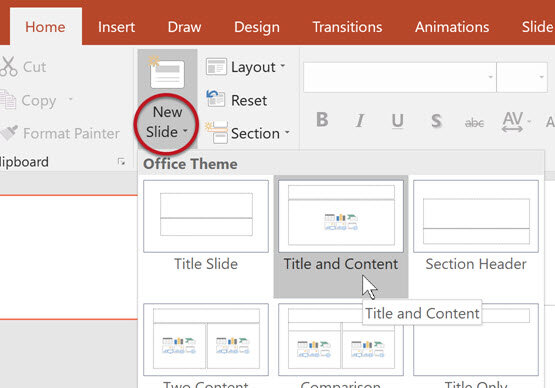
  • properly structure slides: use predefined layouts to ensure a logical order of elements;
  • assign unique titles to slides, so that screen readers can recognize them
  • manage reading order: check the reading order of slides with home > arrange > selection pane. Elements are read from bottom to top in the panel;
  • alternative text for images: add textual descriptions to images for screen reader users. Mark non-essential images as decorative;
  • Tables: mark row and column headers to improve navigation;
  • Links: use descriptive text for links, avoiding URLs and generic texts like “click here”;
  • accessibility check: use the built-in tool in PowerPoint to identify and correct any issues;
  • use clear and readable fonts;
  • avoid using only color to convey information;
  • no animations, or keep them simple;
  • provide subtitles for videos and transcripts for audio files.